
Guided tests in the Eye-Able Dashboard
Test accessibility easily, step by step
With Eye-Able's guided tests, you can independently check criteria from EN 301 549 that cannot be tested automatically. We guide you step by step through your website or web-app, supported by screenshots and clear instructions.

Eye-Able obsługuje ponad 20 000 stron internetowych:




“Automated tests alone aren’t enough to achieve accessibility. But we don’t yet have the expertise for manual testing. What now?”
– Your Product Owner. Right now.
Testing accessibility with no prior knowledge required
The Guided Tests feature in the Eye-Able Dashboard guides you through EN 301 549 so easily that no prior knowledge is required. Step-by-step instructions and visual examples help you confidently assess even complex criteria, especially where automated checks reach their limits.
Faster testing with smart relevance filters
For each test step, the system evaluates how relevant it is for your website. Some criteria must always be checked, while others are automatically assessed based on whether elements such as images, tables, or videos are present. You can also mark criteria as not applicable; they’ll be skipped but still documented. This ensures efficient, complete testing without unnecessary effort.

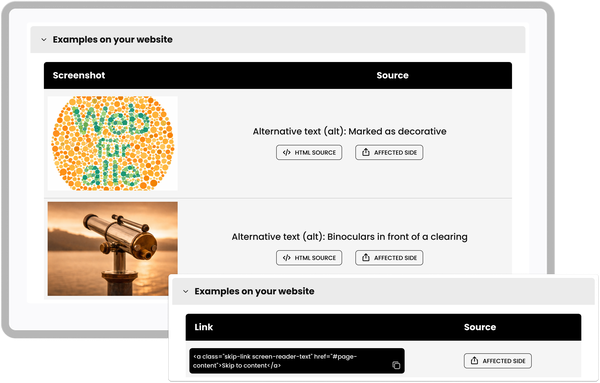
Visual support for more efficient reviews
To speed up your testing process, the software extracts relevant code snippets, images, or screenshots directly from your website and displays them within the test step. No need to switch between tabs, everything you need is right there.
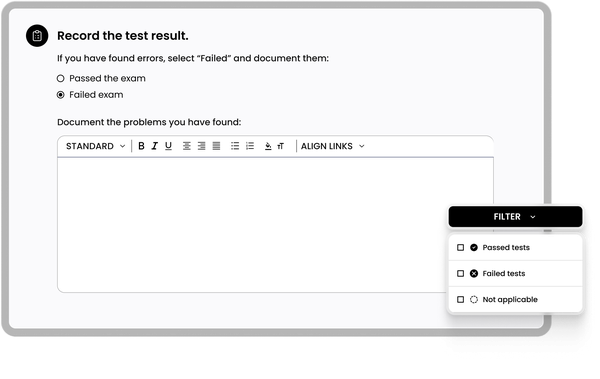
Easily document results
Simply mark each test step as passed, failed, or not applicable. If you identify a barrier, you can add a clear description directly within the tool, automatically building a comprehensive record for your final report.
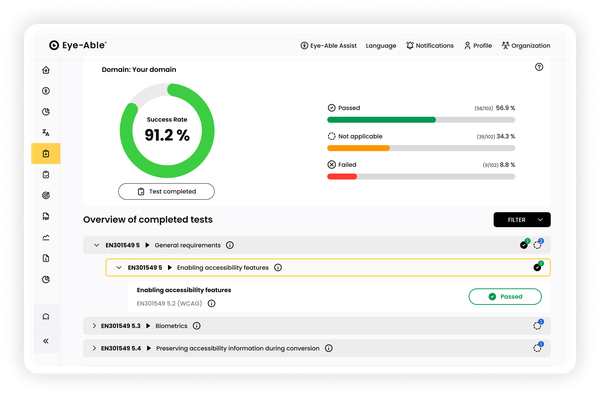
Clear overview of all test results
The Dashboard provides a structured summary of your results. Your team can instantly see where action is needed, prioritize improvements, and verify progress during follow-up checks.
Dlaczego klienci ufają Eye-Able?
Po prostu to zrób. Serio, pierwsze skanowanie za pomocą Eye-Able ujawnia twoje zadania – a potem postępy dzieją się niemal automatycznie. "
Klub FC St. Pauli podejmuje kolejny ważny krok w ramach projektu „Klartext”. Dzięki oprogramowaniu wspomagającemu Eye-Able nasza strona główna będzie w przyszłości technicznie dostosowywana do potrzeb odwiedzających.

„Eye-Able pozwala nam samodzielnie wykrywać i usuwać bariery. Widzimy realny postęp i stale optymalizujemy witrynę dla każdego odwiedzającego”.

„Od 2023 roku inteligentne narzędzia Eye-Able tworzą realną wartość dla naszych użytkowników, pomagając nam jednocześnie spełniać standardy najlepszych praktyk w zakresie SEO, UX i redesignu. Są przyjemne w użyciu i regularnie wzbogacane o nowe, sprytne funkcje”.

„Dostępność jest dla nas ważna nie tylko ze względu na inkluzywność, ale także ze względu na zwiększenie sprzedaży online naszych klientów. Eye-Able okazał się kompetentnym i rozważnym partnerem w tym obszarze”.

" Krótko po wdrożeniu Eye-Able udało nam się podnieść nasz wynik dostępności do 92%. Dzięki temu nasz sklep jest teraz niemal w pełni dostępny i spełnia aktualne wymogi prawne.

" Głównym powodem wyboru Eye-Able było to, że oferuje nam funkcje wsparcia, raporty, dokumentację i konkretne opcje kontroli dla funkcji audytu, wszystko z jednego źródła. "

„Aby zapewnić dostępność treści, projektu i funkcjonalności stron internetowych naszych klientów, korzystamy z Eye-Able. Aplikacja jest intuicyjna w obsłudze i dostarcza naszemu zespołowi ds. treści i programistom precyzyjne informacje. Pozwala nam to natychmiast identyfikować istniejące bariery i skutecznie je eliminować”.

Oprogramowanie Eye-Able jest przejrzyste i przyjazne dla użytkownika, co pozwala nam oszczędzać czas i wysiłek jako dostawcy usług e-commerce. W związku z rosnącym znaczeniem integracji, z dumą aktywnie je wspieramy.

" Narzędzia Eye-Able bardzo nam w tym pomogły. Oprócz poprawy doświadczenia użytkownika, nasza widoczność w rankingach Google wzrosła niemal natychmiast. "

Start your accessibility journey with a free trial
Experience Eye-Able's complete platform with a 14-day free trial. No credit card required - just instant access to all features.
Frequently asked questions
Guided Accessibility Testing
Guided tests are software-guided checks that allow you to assess the digital accessibility of your website or app yourself, even without prior knowledge. In the Eye-Able Dashboard, you are guided step by step through the criteria of EN 301 549, especially in areas where automated tests do not provide reliable results. The software supports you with:
clear step-by-step instructions
screenshots and extracted content such as images, tables, or videos from your website or web app
guidance on testing focus, screen readers, videos, captions, and audio descriptions
This makes it possible to systematically review relevant accessibility requirements without having to interpret WCAG or standards documents yourself.
No. Guided tests are not manual audits and not user tests. At Eye-Able, manual audits and user tests are conducted by certified experts. These involve strict testing criteria and real usage scenarios, for example using screen readers in combination with keyboard navigation or evaluating focus changes. Guided tests, on the other hand, are software-assisted instructions that allow you to carry out test steps yourself without taking on the role of a certified auditor and without using screen readers.
No. Guided tests are explicitly designed for teams without in-depth accessibility expertise. However, a basic knowledge of HTML and websites is helpful.
This enables editorial teams, product teams, or development teams to identify accessibility barriers without prior experience with WCAG or EN standards.
Automated tests mainly detect technical issues, such as:
missing alternative text
insufficient color contrast
formal code problems
However, many core accessibility requirements cannot be tested automatically, for example:
meaningful page structure
correct focus order
meaningful screen reader output
video content
correct captions that can be toggled on and off
synchronized audio descriptions
Guided tests specifically complement automated tests and close these gaps.
The guided tests in the Eye-Able dashboard are based on:
EN 301 549
All WCAG criteria
These standards form the basis for legal requirements such as the EAA. Non-applicable criteria can be skipped but are still documented transparently.
All test steps are documented directly in the dashboard. You mark criteria as passed, failed, or not applicable and add an error description if needed. This creates a clear, traceable documentation suitable for internal reviews, audit preparation, or follow-up assessments.
No. Guided tests do not replace manual audits or user tests performed by certified experts. However, they help to:
assess accessibility internally
reliably identify common WCAG issues
meaningfully complement automated tests
document results in a structured way
For a legally compliant overall assessment, we still recommend combining guided tests with a final expert review. Guided tests are nevertheless very useful for quickly identifying barriers that software alone cannot detect.