:no_upscale():format(png))
Inclusive design - A win for all
Read story
 EAA compliance: Key takeaways
Define your scope: Identify which of your digital products and services fall within the EAA.
Test the whole journey: Look beyond individual pages and combine automated and manual accessibility testing.
Prioritise improvements: Address critical barriers first and fix their underlying causes.
Maintain compliance: Document your work and monitor accessibility continuously.
Whether your organisation falls within the scope of the European Accessibility Act (EAA) depends on the products and services you provide.
The EAA covers selected products and consumer services, including e-commerce services, consumer banking services, electronic communications, e-books and certain elements of passenger transport services. For websites and apps, the key question is therefore not simply whether you have a website, but whether it forms part of a product or service covered by the EAA.
The EAA requirements have applied across EU Member States since 28 June 2025, through national legislation implementing the Directive. However, this does not mean that every website, app or digital touchpoint automatically falls within scope.
Start by defining your own scope:
Which digital products and services do you provide?
Which of them are offered to consumers?
Which websites, apps and digital processes are part of those services?
Are any exemptions relevant to your organisation?
This is particularly important for organisations operating across several EU countries, as enforcement, penalties and some details of implementation can vary between member states.

Once you know which digital services fall within scope, the next step towards EAA compliance is to understand how accessible they are today.
An accessibility assessment helps you identify existing barriers and see where action is needed.
But don't limit your assessment to individual pages or isolated WCAG criteria. You also need to look at the entire customer journey.
An accessible homepage has little value if someone later gets stuck when filling in a form, logging into their account or completing a purchase.
Pay particular attention to important user journeys such as:
registration and login
search and navigation
forms, including contact and registration forms
booking and ordering processes
payment and checkout
downloads and documents
Automated accessibility testing can identify many technical issues quickly, but it cannot detect every barrier. Manual testing is therefore an essential addition, particularly for complex functionality and business-critical customer journeys.
This gives you more than a list of individual errors. It provides a much more realistic picture of whether people with disabilities can actually use your digital service independently from start to finish.

Once your assessment is complete, you will know where improvements are needed. On a large website or digital platform, this can result in a considerable number of findings.
Instead of simply working through a long list of issues, prioritise them according to their actual impact on users.
Barriers that prevent someone from completing an important task or accessing essential information should be addressed first.
Consider:
Severity: How significantly does the barrier affect someone's ability to use the service?
Scale: Does the issue occur in one place, or is it caused by a reusable component that appears across hundreds of pages?
Relevance: Does it affect a key function or customer journey?
Effort: Which issues can be resolved quickly, and which require more substantial technical changes?
This turns your accessibility assessment into a practical remediation plan and helps your teams focus first on the issues that have the greatest impact.
The next step is remediation.
Where possible, don't just fix an issue where it was discovered. Look for its underlying cause.
For example: if the same button cannot be operated using a keyboard across several pages, the problem may sit within a shared component. Fixing that component could remove the barrier across your entire website at once.
The same applies to recurring issues in templates, forms or design systems. The earlier accessibility is considered at this level, the fewer individual problems teams need to fix later.
The goal should not simply be to close a list of accessibility findings.
Sustainable EAA compliance means embedding accessibility into your design, development and content processes so that the same barriers are less likely to appear again.
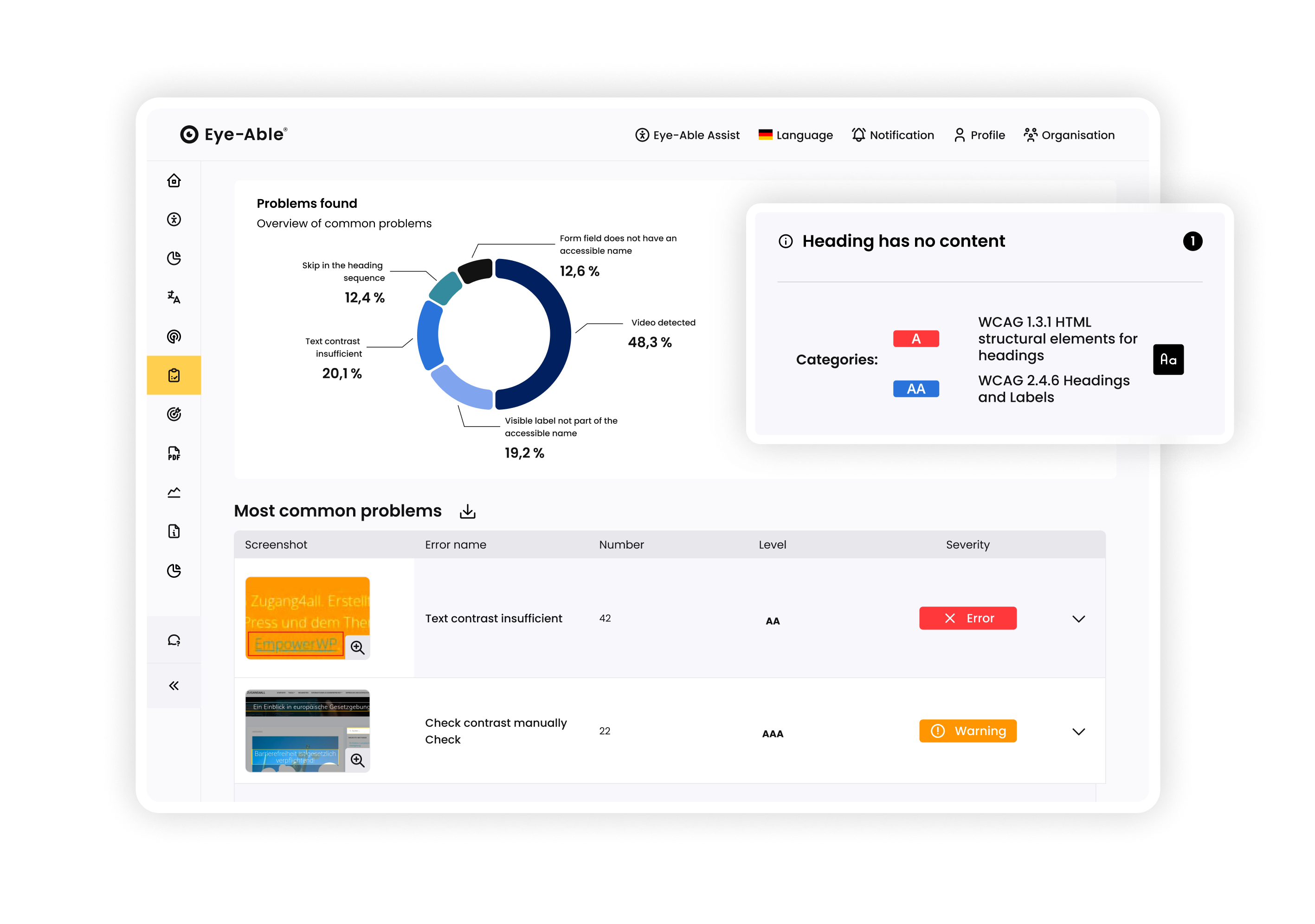
Once changes have been implemented, check whether the barriers have genuinely been resolved.
A technical fix does not automatically mean that a digital service is accessible in practice.
Regression testing is particularly useful for complex functionality and important customer journeys. Automated testing can confirm many technical improvements, while manual testing can uncover problems that tools struggle or are unable to detect.
Testing with people with disabilities adds another valuable perspective. It can show whether a process is genuinely understandable and operable and whether it works with different assistive technologies.
The aim is to make sure that a change made in the code translates into a meaningful improvement for the people using your service.
EAA compliance is not only about identifying and removing accessibility barriers. Organisations should also be able to demonstrate how they are meeting the applicable accessibility requirements.
Document:
which digital services and user journeys have been assessed
which accessibility barriers were identified
which corrective measures were taken
the results of subsequent tests
responsibilities within your organisation
your processes for ongoing accessibility monitoring
This documentation provides an internal record of your progress and makes it easier to respond if a national market surveillance or enforcement authority requests information.
For services covered by the EAA, the Directive also requires providers to make information available on how the service meets the relevant accessibility requirements and to demonstrate that their service delivery and monitoring processes support continued compliance.
In other words, documentation should not be treated as an afterthought. It is part of building a sustainable EAA compliance process.
If your service falls within the scope of the EAA, you also need to provide information explaining how it meets the relevant accessibility requirements.
Under Annex V of the EAA, this information should include, where applicable:
a general description of the service in accessible formats
the descriptions and explanations needed to understand how the service operates
a description of how the relevant accessibility requirements are met
The Directive states that this information should be included in the general terms and conditions or an equivalent document. The precise implementation and terminology can differ between member states.
Depending on the country and applicable national legislation, organisations may therefore provide this information through an accessibility statement or a comparable accessibility information page.
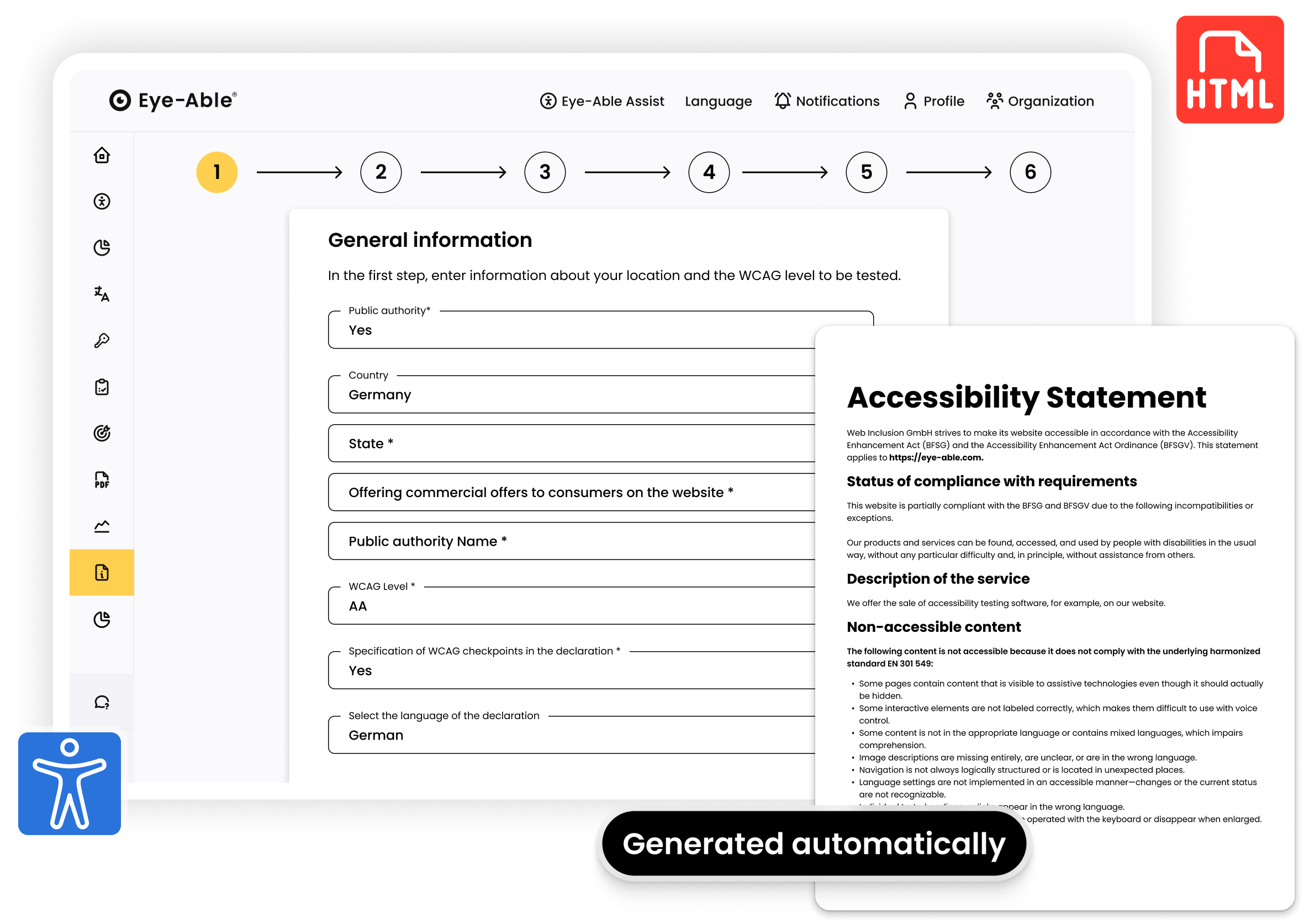
One important distinction: publishing accessibility information is not the same as simply declaring that your website is “fully accessible”. The purpose is to communicate transparently how your service addresses the applicable requirements.
Passing an accessibility assessment and fixing existing problems does not mean the work is finished.
Websites and digital services change constantly. New content is published, components are updated, features are added and entire customer journeys are redesigned.
Every one of these changes can introduce new accessibility barriers.
Regular automated monitoring can help identify technical problems at an early stage. Larger changes and important customer journeys should also be reviewed manually.
The EAA specifically expects service providers to ensure that their service delivery and monitoring processes support continued compliance with the applicable requirements.
Long-term EAA compliance therefore means treating accessibility as an ongoing responsibility rather than a one-off project.
Embed it into:
content creation
design
development
quality assurance
procurement
release processes
That way, accessibility becomes part of how your organisation works rather than something you have to fix shortly before the next audit.
Making a website EAA-compliant involves much more than fixing individual accessibility issues.
You need to look at your digital services as a whole – from defining the right scope and assessing accessibility to remediation, documentation and continuous monitoring.
Organisations that embed accessibility into their content, design, development and quality assurance processes are in a much stronger position to maintain EAA compliance over time.
At the same time, they create digital services that are easier and more convenient for more people to use.
Want to know where you stand today? With Eye-Able, you can assess your digital services, prioritise accessibility barriers and monitor your progress continuously.
Get an initial overview of your website’s accessibility status – with no obligation and no prior expertise required.
Frequently Asked Questions
That depends on the products and services you provide.
The EAA covers selected consumer-facing products and services, including e-commerce, consumer banking, electronic communications, e-books and certain passenger transport services. A website or app that forms part of an in-scope service may therefore need to meet the relevant accessibility requirements.
There are also exemptions, including an exemption under the Directive for microenterprises providing services. Your exact obligations should therefore always be assessed in the context of the relevant national legislation.
EU Member States have applied the measures implementing the European Accessibility Act since 28 June 2025.
There are limited transitional arrangements. For example, the Directive provides for a transition period ending on 28 June 2030 in certain cases involving products already lawfully used by service providers before the EAA became applicable. Service contracts agreed before 28 June 2025 can also continue unchanged until they expire, but for no longer than five years from that date.
The more useful question is whether the parts of your website or digital service that fall within the scope of the EAA meet the applicable accessibility requirements.
Accessibility cannot reliably be reduced to a single percentage or automated accessibility score. Automated tools can identify many issues, but they cannot determine whether every interaction and customer journey works for people using assistive technologies.
The EAA also contains defined exemptions and exceptions, including cases involving a fundamental alteration or disproportionate burden.
This is why a combination of technical standards, automated testing, expert manual testing and real-world user testing provides a much stronger basis for EAA compliance than a single score.
If you want to learn more about how much accessibility is legally required, we recommend our blog article "Which level of accessibility is required for my website?"
Enforcement is handled at national level.
Depending on the member state and the nature of the non-compliance, authorities may investigate complaints, request information, require corrective action, restrict a product or service, or impose penalties under national law. The level and form of penalties therefore differ across the EU.
No.
Websites and digital services evolve continually. New content, software releases, design changes and third-party integrations can introduce accessibility barriers even after an organisation has completed a comprehensive accessibility project.
Continuous monitoring, combined with manual testing after significant changes, helps make accessibility part of ongoing quality assurance rather than a one-off exercise.
Accessibility testing helps you identify barriers in your website, app or digital service.
Documentation provides evidence of what you tested, what you found, how issues were addressed and how your organisation intends to maintain accessibility over time.
For covered services, the EAA also requires information on how the service meets the applicable accessibility requirements and evidence that the service delivery and monitoring process supports continued compliance.
Inclusive design - A win for all
Read story:no_upscale():format(png))
Visual customization options from Eye-Able
Read story:no_upscale())
Accessibility on the Internet: Duty or matter of the heart?
Read story:no_upscale():format(png))
Integration with dynamic reloading
Read story:no_upscale():format(png))
Why is inclusion so important in the workplace?
Read story:no_upscale():format(png))
How the Eye-Able® Assist read aloud function works and can be adapted to the website
Read story:no_upscale():format(png))
Why should all websites be accessible?
Read story:no_upscale():format(png))
We have won the Würzburg Startup Award!
Read story:no_upscale():format(png))
What is color blindness and how Eye-Able helps
Read story:no_upscale():format(png))
What is color blindness and how Eye-Able helps
Read story:no_upscale():format(png))
How do I use a website as a visually impaired person?
Read story:no_upscale():format(png))
Operation of Eye-Able with the keyboard
Read story:no_upscale():format(png))
:no_upscale():format(png))