:no_upscale())
What does an inaccessible website really cost?
Read story
 Eye-Able® as an alternative: What organisations really need
The market for accessibility solutions is expanding rapidly. Countless tools promise to check websites for barriers quickly and easily – often even free of charge. But on closer inspection, many of these offers are limited to one-off tests, providing error reports but no sustainable solutions.
Assistive technologies such as screen readers, braille displays, or voice control reveal that these superficial checks only tell half the story. Their true value lies in reflecting the everyday reality of users. They show how content is actually experienced and where people encounter barriers that purely technical tests often fail to capture.
In the UK, organisations face clear legal obligations under the Equality Act 2010 and the Public Sector Bodies (Websites and Mobile Applications) Accessibility Regulations 2018. At the same time, international standards such as EN 301 549 and WCAG 2.1 define the technical criteria that must be met. Organisations therefore need systems that not only ensure legal compliance but also enable genuine digital participation and inclusion – in other words, websites and apps that can be used by everyone, regardless of their abilities.
In this article, we compare different approaches to accessibility testing and show why Eye-Able® is more than just an “alternative”: it is a platform that takes a holistic view of accessibility and guarantees it for the long term.
 What are accessibility tools and testing software?
Accessibility tools and testing software are programmes designed to check whether digital content is accessible for people with disabilities. Some appear as simple widgets or plugins that can be integrated directly into a CMS or other website systems. They automatically analyse websites and assess whether basic standards are being met.
Typical checkpoints include adjustable settings such as font size, colour options, or sufficient contrast. Often missing, however, are features like an activatable high-contrast mode, colour filters, a blue-light filter, or a night mode – all of which improve readability for users with visual impairments.
Content-related issues are also common: missing alt tags, absent or incomplete image descriptions can make content unusable for screen readers. Audiovisual content is equally critical: without captions, videos remain inaccessible to users with hearing impairments. Keyboard accessibility is another key factor. Errors such as incorrect tab order or inadequate keyboard navigation can make interaction unnecessarily difficult.
On a technical level, faulty form elements, poorly structured HTML, or deviations from HTML specifications can prevent digital content from being fully accessible.
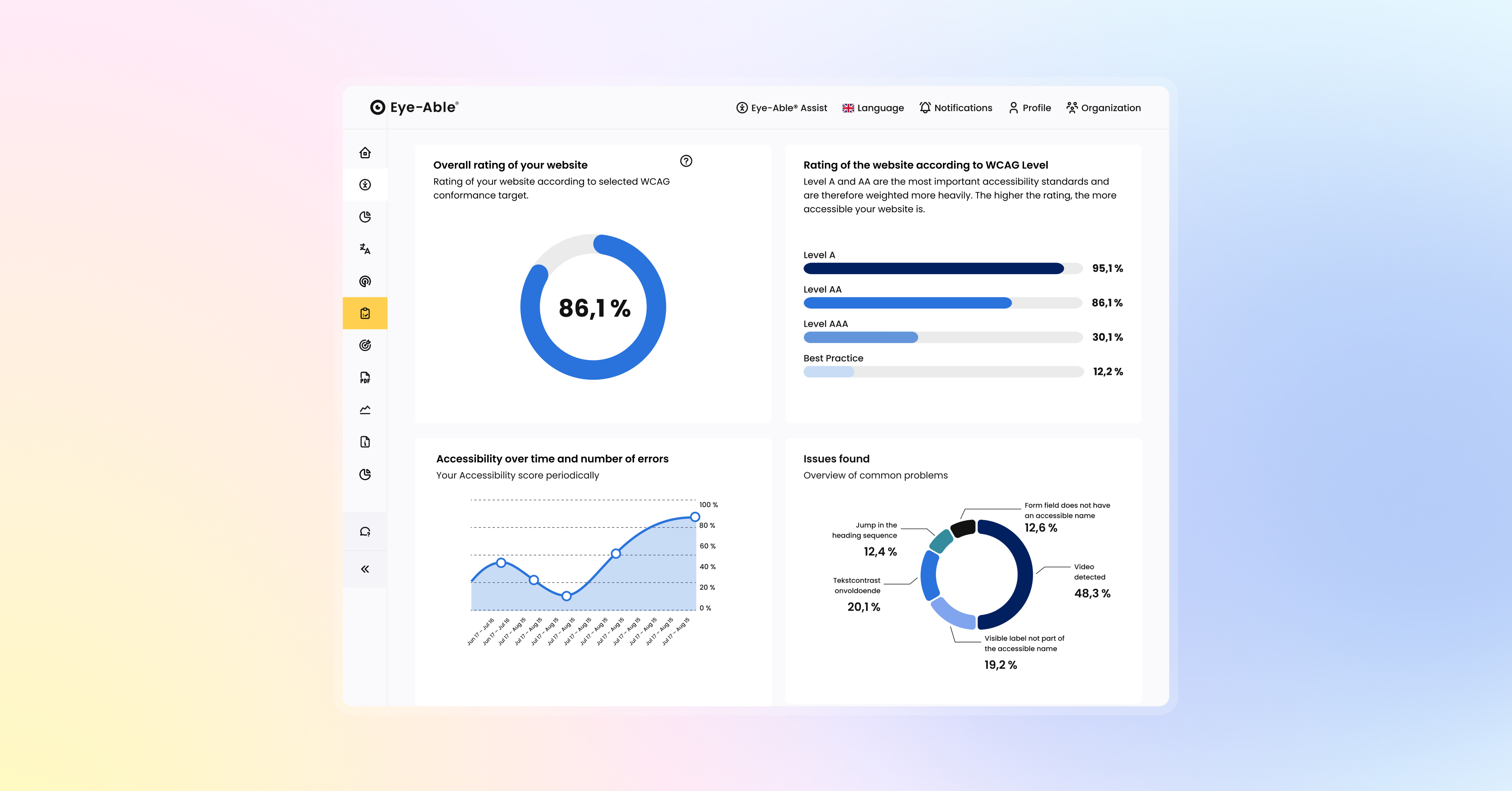 Benefits of a software solution for digital accessibility
Professional accessibility software offers several key advantages:
Regular testing ensures ongoing compliance, as websites are constantly changing and new content is added.
Improved usability leads to a better user experience for everyone – not just people with disabilities.
SEO benefits arise from cleaner page structure and semantic HTML elements, which also help search engines.
Legal assurance is provided through demonstrable compliance with WCAG 2.1 Level AA and other relevant standards.
Many free accessibility check tools only provide snapshot reviews. This creates significant risks:
A false sense of security can occur if organisations assume that a single test makes them fully compliant.
Legal risks remain, as websites are dynamic and new barriers can appear. Only platforms with integrated auditing and monitoring can ensure sustainable compliance.
Lack of actionable guidance often leaves teams with a list of errors but no clear instructions on how to fix them.
When looking for an Eye-Able alternative, you should consider several factors:
Scope and continuity of testing set professional solutions apart from free tools.
Free tests can be a starting point, but they are rarely enough for full compliance.
Tailored solutions adapt to the specific needs of your organisation.
 Testing accessibility – What are the options?
When it comes to checking digital accessibility, organisations have several options. Each approach has its strengths, but also its limitations. To find the right solution, it’s worth looking at the main methods.
Automated accessibility tools are ideal for quickly scanning websites for common accessibility issues.
Advantages:
Fast results, even for large and complex websites
Cost-efficient for recurring checks
Scalable – suitable for organisations with many domains or subpages
Disadvantages:
Only around 30-40% of known issues are detected by even the best automated tools in UK government audits.
Often provide error reports without practical guidance
Risk of false positives, which can create extra workload for teams
Manual testing can be carried out in two ways: either by trained accessibility experts or by internal teams conducting their own reviews.
In-house manual testing: Many organisations use checklists or self-designed tests to review their websites. This raises awareness but is prone to error – without specialist knowledge, many barriers go unnoticed (e.g., screen reader issues, semantic structures, or complex navigation patterns).
Expert manual testing: Professional accessibility testers use specialised methods and assistive technologies. This delivers the most accurate evaluation of digital accessibility.
Advantages:
Detects complex barriers that automated tools miss
Evaluates real usability with screen readers and assistive technologies
Provides contextual assessment of content, language, and interactions
Disadvantages:
Time-consuming and resource-intensive
More costly than automated solutions
Dependent on the availability of qualified specialists
The most effective strategy is a combination of both methods. This hybrid approach ensures comprehensive coverage and sustainable quality assurance:
Automated testing identifies technical issues and enables continuous monitoring.
Manual testing complements automation by uncovering complex barriers and capturing real user experiences.
Professional solutions such as Eye-Able® integrate both: automated checks, expert feedback, and actionable recommendations – all supported by a dashboard and customer success managers who guide organisations through the entire compliance process.
Many organisations focus solely on upfront costs and overlook the long-term return on investment (ROI) of accessibility. Research shows that every pound invested in accessibility can generate up to a hundredfold return. The benefits include:
A wider audience: Disabled people represent a market with an annual global spending power of over USD 13 trillion.
Improved SEO performance and higher conversion rates.
Reduced legal risk and avoidance of costly litigation.
A common misconception is that accessibility is only a voluntary measure. In reality, stricter regulations apply in the UK and across the EU:
Equality Act 2010 (UK): Prohibits discrimination and requires “reasonable adjustments,” which include accessible digital services.
Public Sector Bodies Accessibility Regulations (UK, 2018): Legally binding for public sector websites and mobile apps, aligned with EU Directive 2102.
European Accessibility Act (EAA): Sets binding minimum standards for digital products and services across the EU.
WCAG 2.2 Level AA: Provides the technical foundation for most legal requirements and compliance benchmarks.
Another common misconception concerns so-called website overlay tools. These sit as an additional layer on top of a site and may provide users with helpful features such as contrast adjustment or text resizing. However, they cannot replace a fully accessible website. At best, they are a supplement – true accessibility requires implementing WCAG guidelines directly in the code and in the content itself.
Accessibility should not be treated in isolation but as an integral part of organisational processes. Common integration mistakes include:
Lack of training for developers and content managers
Treating accessibility as an add-on rather than a core design principle from the outset
Unclear responsibilities within the organisation
The biggest risk lies in assuming accessibility is a one-time process. In reality, websites are constantly changing due to:
Content updates and new functionality
Design changes and technical updates
New or revised standards and legal requirements
Automated accessibility scoring makes it possible to measure progress and document improvements over time. Alerts notify you automatically if new barriers are introduced through updates to your CMS or online shop. This is particularly important because websites are constantly evolving.
The best accessibility tools go beyond error detection and provide:
Step-by-step guidance on how to fix identified issues
Prioritisation by severity and impact on users
Code examples and best-practice recommendations
Automated tools can detect only around 30–40% of barriers. That’s why it’s vital to choose solutions that also include manual expert reviews, such as:
Usability testing with real users with disabilities
Screen reader testing for realistic evaluation
Keyboard navigation testing to verify full operability
Instead of managing multiple providers and contracts, organisations benefit from a centralised solution. A single provider reduces administrative effort, lowers coordination costs, and ensures smooth integration. At the same time, additional partners – such as a web design agency – can be easily integrated. Key features to look for include:
API integration for seamless workflows
Multi-site management for central control of multiple domains
Compliance reporting for stakeholders and audits
Eye-Able® is a future-proof all-in-one solution for organisations that take digital accessibility seriously. The platform combines several components:
Eye-Able® Audit – simple validation of websites against WCAG standards.
Eye-Able® Report – comprehensive analyses with a domain-wide overview and clear reporting that makes accessibility progress measurable and transparent.
Eye-Able® Assist – assistive software with more than 25 accessibility features.
With Eye-Able’s holistic approach, organisations gain a decisive advantage: rather than only testing or only offering assistive technology, Eye-Able® supports you throughout the entire compliance process. In addition to software, Eye-Able® also provides WCAG testing, as well as training and workshops on digital accessibility.
Eye-Able® provides an integrated platform that combines audit software, reporting tools, and assistive technology. Unlike standalone testing tools or overlay solutions, Eye-Able® supports the entire journey to accessibility – from analysis and remediation through to continuous monitoring.
Accessibility should be monitored continuously, as websites are constantly changing. Automated checks should be carried out after every major update, while more comprehensive manual reviews should take place at least quarterly or whenever significant changes are made.
Free tools can be useful for initial insights but are not sufficient to ensure compliance with the Equality Act 2010 or the Public Sector Bodies Accessibility Regulations (2018). They only detect a fraction of potential barriers and usually lack continuous monitoring or expert support.
Eye-Able® tests against WCAG 2.2 criteria at Levels A, AA, and AAA – the technical standards underpinning UK accessibility law. In addition, clients benefit from expert guidance, training, and workshops to build long-term accessibility into their processes.
What does an inaccessible website really cost?
Read story:no_upscale())
Your WordPress site is never really finished: Why continuous maintenance matters
Read story:no_upscale())
A New Leadership Team for Eye-Able: Oliver Berchtold Appointed CEO
Read story:no_upscale():format(png))
HubSpot drops orange: how accessibility reshaped the CRM's design
Read story:no_upscale())
AC Monza chooses Eye-Able for digital accessibility
Read story:no_upscale())
How to make your website EAA-compliant in 8 steps
Read story:no_upscale())
Looking back at the 2026 World Cup: How accessible was the tournament really?
Read story:no_upscale())
Accessibility warnings in Austria? What European businesses need to know
Read story:no_upscale())
New: Eye-Able brings digital accessibility directly into the development environment
Read story:no_upscale())
Groundbreaking new AI-powered tests come to Eye-Able Audit
Read story:no_upscale())
One year of the EAA: Where businesses still fall short
Read story:no_upscale())
No, an overlay tool doesn’t magically make a website accessible
Read story:no_upscale():format(png))
:no_upscale():format(png))