
Verifica dell'accessibilità delle offerte digitali
Verificare in modo efficiente l'accessibilità digitale
Verifica siti web, app e PDF in modo automatico e manuale e individua tutte le barriere a colpo d'occhio. Eye-Able fornisce raccomandazioni concrete e elenchi di errori ordinati per priorità.
:no_upscale())
Più di 10,000 clienti si fidano della nostra soluzione
:quality(70):no_upscale())

:quality(70):no_upscale())
:quality(70):no_upscale())
:quality(70):no_upscale())
:quality(70):no_upscale())
:quality(70):no_upscale())
:quality(70):no_upscale())
:quality(70):no_upscale())
:quality(70):no_upscale():format(png))
:quality(70):no_upscale())
:quality(70):no_upscale())
:quality(70):no_upscale():format(png))
:quality(70):no_upscale())
:quality(70):no_upscale())
:quality(70):no_upscale())
:quality(70):no_upscale())
:quality(70):no_upscale())
:quality(70):no_upscale())
:quality(70):no_upscale())
:quality(70):no_upscale():format(png))
:quality(70):no_upscale())
:quality(70):no_upscale())
:quality(70):no_upscale())
:quality(70):no_upscale())
:quality(70):no_upscale())
:quality(70):no_upscale())
:quality(70):no_upscale())
:quality(70):no_upscale())
:quality(70):no_upscale())
:quality(70):no_upscale())
:quality(70):no_upscale())
Perché l'accessibilità è essenziale per le aziende
La verifica dell'accessibilità digitale riduce i rischi legali, amplia la tua portata e rende siti web, app e PDF accessibili a tutti gli utenti. Eye-Able offre verifiche rapide e trasparenti: automatizzate, basate su software e condotte da persone con disabilità.

Soddisfare i requisiti legali

Raggiungere tutti gli utenti
"Come posso verificare rapidamente se le nostre offerte digitali sono accessibili?"
Il tuo responsabile dell'e-commerce in questo momento.
Verifiche complete dell'accessibilità con la piattaforma Eye-Able
Con Eye-Able puoi verificare le tue risorse digitali in pochi passaggi. Grazie a scansioni automatizzate, test guidati dal software e verifiche manuali condotte da persone con disabilità, potrai individuare le barriere in modo efficiente, indipendentemente dal tuo livello di esperienza.

Scansioni automatizzate con oltre 125 regole di controllo

Utilizzo intuitivo per ogni livello di esperienza

Combinazione di controlli automatici e manuali
Le soluzioni della piattaforma Eye-Able per ispezioni efficienti
Individua immediatamente gli errori, direttamente sul tuo sito
Eye-Able Audit come estensione del browser
Con la funzione Audit puoi controllare automaticamente i siti web direttamente dal tuo browser. L'estensione del browser ti mostra in tempo reale gli ostacoli e i punti del codice interessati direttamente sulla tua pagina. L'interfaccia intuitiva è adatta a utenti di ogni livello di esperienza.
:no_upscale())
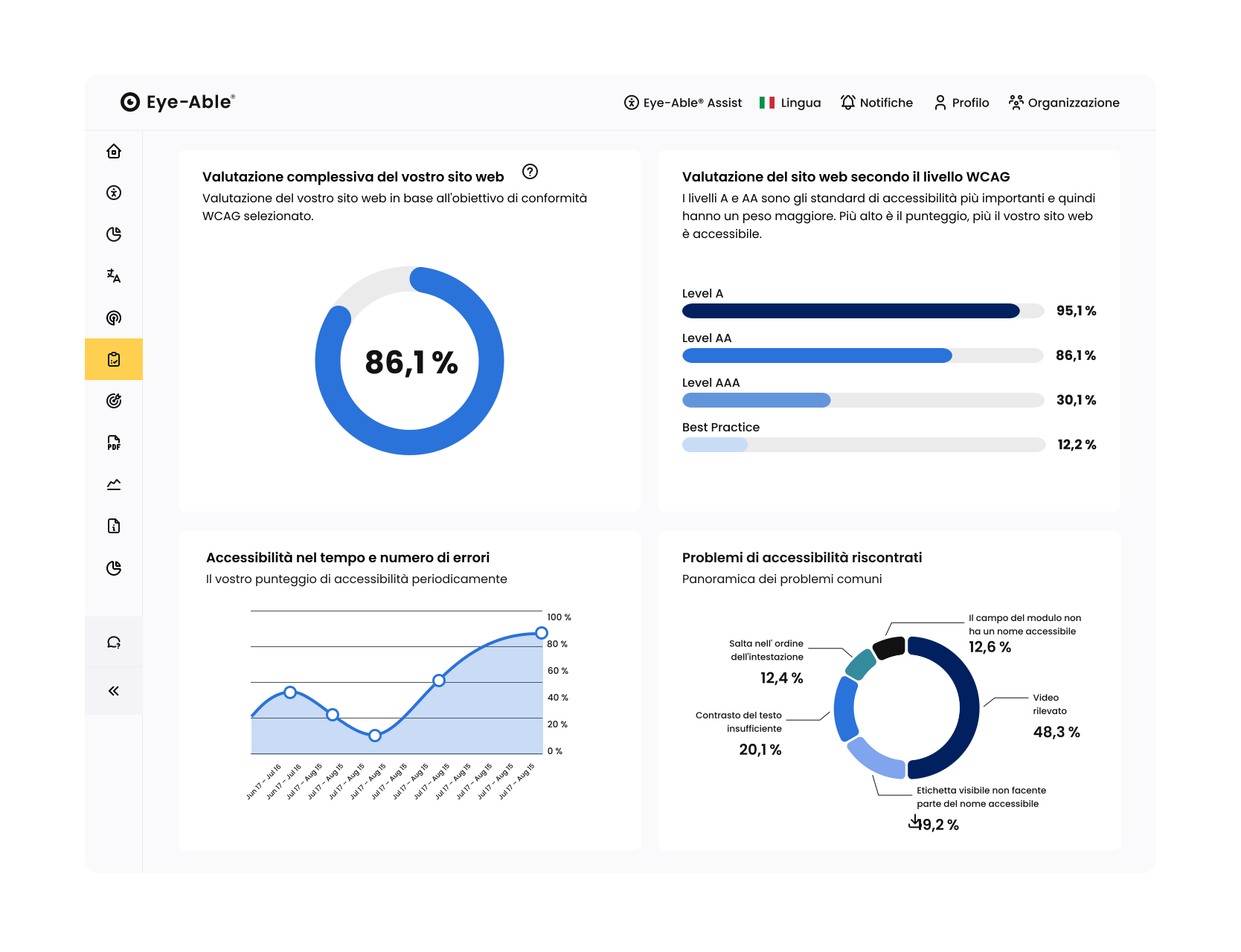
Progressi, punteggi e priorità in un colpo d'occhio
Rapporto nel dashboard Eye-Able
Il report mostra il punteggio di Eye-Able in base agli obiettivi e ai problemi identificati. Puoi anche controllare i contenuti dinamici, come i login e i moduli. È possibile utilizzare la funzione di gestione dei progetti per assegnare compiti o collegarli direttamente a Jira.
Verifica guidata di ciò che l'automazione non riesce a fare
Verifica guidata dal software nella dashbord di Eye-Able
Le verifiche guidate dal software colmano le lacune dei controlli automatizzati. Eye-Able ti guida passo dopo passo attraverso le questioni di accessibilità ancora aperte, con screenshot, contenuti estratti e istruzioni chiare. In questo modo puoi verificare i tuoi contenuti in modo rapido e affidabile, anche senza conoscenze preliminari.
:no_upscale())
:no_upscale())
Prospettiva dell'utente per un'accessibilità a 360 gradi
Test manuali effettuati dalle persone interessate
Le persone con disabilità verificano scenari d'uso reali e individuano barriere che gli strumenti automatizzati non rilevano, ad esempio in termini di comprensibilità o navigazione. I risultati vengono raccolti centralmente nella dashboard di Eye-Able.

Valutazione preliminare tramite prove di utilizzo condotte da persone con disabilità

Verifica di accessibilità a 360 gradi con di documentazione
Verifica della conformità legale
Test completo sull'accessibilità a cura del team Eye-Able
Il team di esperti Eye-Able verifica siti web e app in base alle WCAG, alla norma EN 301 549 e agli standard nazionali pertinenti quali BITV/BFSG, ADA o AGID. Il risultato: rapporti strutturati (ad es. VPAT) con raccomandazioni prioritarie per la progettazione, lo sviluppo e la gestione.
:no_upscale())
:no_upscale())
Audio e video accessibili a tutti
Trascrizione nella dashboard di Eye-Able
Con Eye-Able puoi verificare la presenza di trascrizioni mancanti in audio e video e completarle direttamente. Crea trascrizioni multilingue e aggiungi automaticamente i sottotitoli ai video. L'IA riconosce le parole pronunciate e i contenuti visivi. I sottotitoli possono essere incorporati direttamente nel video.
Approfondimenti dettagliati sui vostri contenuti per migliorare le prestazioni
Analisi dei contenuti e del sito web nella dashboard di Eye-Able
Individua i link non funzionanti, analizza le prestazioni e la SEO con Lighthouse, individua tempi di caricamento elevati, errori ortografici e problemi di leggibilità e verifica che i font non presentino problemi di design o di licenza
:no_upscale())
:no_upscale())
Creare facilmente PDF accessibili
Verifica dei PDF nel report di Eye-Able
Con Eye-Able puoi verificare tutti i PDF del tuo sito web in base agli standard PDF/UA e WCAG. Il punteggio e i report ti mostrano i gruppi di errori rilevanti. L'intelligenza artificiale risolve automaticamente problemi tipici come tag mancanti, metadati, testi alternativi e struttura.
Rapporti di contrasto ottimizzati per una migliore accessibilità
Strumento di verifica del contrasto nella dashboard di Eye-Able
Nella dashboard di Eye-Able puoi confrontare i rapporti di contrasto dei colori in modo semplice e veloce. In questo modo ti assicuri che soddisfino i requisiti di accessibilità: l'ideale per la revisione della vostra identità aziendale.
:no_upscale())
Documentare i risultati dei test manuali
Il vostro team di esperti o i vostri tester certificati possono utilizzare la funzione “Test manuali” nella dashboard di Eye-Able per documentare le fasi di verifica previste dalla BITV. In questo modo avrete tutti i risultati, dalle scansioni automatizzate agli audit guidati fino ai test manuali effettuati da esperti, raccolti in un unico posto.

Gestione centralizzata
Documentare tutte le fasi di verifica direttamente nella dashboard ed esporta comodamente i risultati in un report in formato PDF.

Verifica da parte degli esperti di Eye-Able
Il nostro team di esperti con disabilità testa il vostro sito e individua le barriere che i test automatizzati non riescono a rilevare. I risultati sono consultabili nella dashboard.
:no_upscale())
Il tuo percorso verso l'accessibilità con una versione di prova gratuita
Prova la piattaforma completa di Eye-Able con una versione di prova gratuita di 14 giorni.
:no_upscale():format(png))
Domande frequenti
Domande frequenti sulla piattaforma per l'accessibilità
Quando fai verificare l'accessibilità delle tue offerte digitali, il tuo sito web, la tua app o i tuoi documenti vengono sistematicamente controllati per verificarne l'usabilità da parte delle persone con disabilità. A tal fine distinguiamo tre approcci metodologici:
Test automatizzati: questo è il modo più veloce per verificare l'accessibilità del tuo sito. Il nostro software analizza il tuo codice e individua immediatamente circa l'80% delle cause di errori tecnici, come ad esempio la mancanza di testi alternativi per le immagini o un contrasto cromatico insufficiente. Ciò ti offre una solida base e risultati immediati nel rapporto Eye-Able.
• Test guidati dal software: in questo contesto, la nostra tecnologia ti aiuta a verificare i contenuti che richiedono una decisione umana. Il software guida te o il tuo team passo dopo passo attraverso criteri specifici – ad esempio: “Questo titolo ha senso dal punto di vista del contenuto?” oppure “La dicitura di questo pulsante è precisa?”. In questo modo puoi approfondire aspetti più complessi anche senza conoscenze specialistiche.
• Controlli manuali: per garantire un controllo di qualità completo, esperti o utenti con disabilità effettuano verifiche mirate. Ad esempio, il sito viene navigato esclusivamente tramite tastiera oppure viene verificata la coerenza logica dei contenuti utilizzando uno screen reader (software di lettura ad alta voce). Questi test coprono quelle sottigliezze che l'intelligenza artificiale da sola non è ancora in grado di cogliere appieno.
Sono inoltre disponibili ulteriori strumenti di verifica, come il Contrast Checker, l'analisi web e dei contenuti o la verifica dei PDF, per controllare in modo mirato diversi aspetti dell'accessibilità.
L'accessibilità digitale non è uno stato statico, ma un processo continuo. Quando fai testare l'accessibilità del tuo sito web o della tua app, ti assicuri che i nuovi contenuti, gli aggiornamenti o le modifiche al design siano inclusivi per tutti gli utenti. Per gli enti pubblici e gli istituti di istruzione, questo è già obbligatorio da tempo. A partire da giugno 2025, tale obbligo si applicherà anche alle aziende. Test regolari aiutano a soddisfare i requisiti della Legge tedesca sull'accessibilità senza barriere (BFSG) e ad aumentare l'usabilità per tutti i gruppi target.
A seconda del tipo di organizzazione, si applicano standard diversi. Per gli enti pubblici fa fede la BITV 2.0. Quando le aziende del settore privato testano la propria accessibilità, si basano solitamente sulle WCAG 2.1 (Livello AA) per soddisfare i criteri della Legge tedesca sull'accessibilità senza barriere (BFSG). Eye-Able ti aiuta ad attuare questi standard nel miglior modo possibile e a rendere la tua presenza digitale accessibile agli utenti, in modo che tu possa affrontare i requisiti di legge in modo mirato.
Gli strumenti automatizzati sono estremamente efficienti: sono in grado di identificare immediatamente circa l'80% delle fonti di errore tecnico. Tuttavia, per garantire un'accessibilità completa, è necessaria una verifica manuale complementare. Aspetti quali la sequenza logica di lettura o la corretta interpretazione da parte degli screen reader per gli utenti possono essere valutati con maggiore precisione grazie alla competenza umana. Raccomandiamo quindi un approccio ibrido per ottenere la massima qualità nei test di accessibilità.
Per garantire un'accessibilità duratura e la conformità normativa (ad esempio ai sensi della BFSG o della BITV), è fondamentale un mix di continuità e verifiche approfondite mirate:
Monitoraggio continuo (automatizzato): consigliamo di integrare sistematicamente i test di accessibilità nel processo editoriale e di sviluppo. Eye-Able ti aiuta in questo, eseguendo ogni 7 giorni una scansione automatica del tuo sito web alla ricerca di eventuali barriere. Questo monitoraggio settimanale garantisce che i nuovi contenuti non introducano barriere inosservate per gli utenti.
• Controlli ad hoc (per le modifiche): ogni volta che vengono pubblicati nuovi modelli di pagina o vengono apportate modifiche funzionali significative al codice, è opportuno verificarle direttamente durante il processo di sviluppo.
• Audit completi (strategici): oltre al monitoraggio automatico, in caso di aggiornamenti di ampia portata o di un rilancio è opportuno effettuare una verifica manuale da parte di esperti. Mentre il software individua immediatamente gli errori tecnici, una verifica garantisce che anche le strutture di navigazione più complesse siano organizzate in modo logico e ottimale per gli utenti di screen reader.
Sì, è un elemento fondamentale di un sito web accessibile. L'accessibilità non si limita al codice HTML: anche tutti i documenti messi a disposizione per il download devono essere leggibili dalle tecnologie assistive (come gli screen reader).
Ecco come ti supportiamo:
Controllo secondo lo standard PDF/UA: analizziamo i tuoi file PDF in base allo standard internazionale PDF/UA (ISO 14289-1) e ai criteri WCAG.
• Analisi strutturale: la nostra scansione verifica che il documento sia correttamente «taggato». Solo così gli screen reader sono in grado di riconoscere il corretto ordine di lettura, le gerarchie dei titoli e le strutture delle tabelle.
• Metadati e descrizioni delle immagini: verifichiamo se è stato inserito un titolo per il documento e se tutte le immagini in esso contenute dispongono di testi alternativi corretti.
• Integrazione perfetta: Durante la scansione automatizzata del sito web, Eye-Able rileva i documenti PDF collegati ed elenca gli errori di accessibilità direttamente nella tua dashboard.
Importante: nella verifica ufficiale dell'accessibilità (ad esempio da parte degli enti regionali), i PDF non conformi rappresentano uno dei punti di errore più frequenti. Con questa verifica ti assicuri che le tue informazioni rimangano completamente fruibili per tutti gli utenti, indipendentemente dal fatto che abbiano o meno una disabilità.
Non solo gli enti pubblici, ma anche molte aziende del settore privato dovranno fornire, a partire dalla metà del 2025, una dichiarazione di accessibilità per i propri servizi digitali. Effettuare test regolari è fondamentale: un audit professionale ti mostra nero su bianco a che punto è la tua azienda. Con questi dati puoi redigere una dichiarazione trasparente che indichi esattamente quali processi sono già accessibili e su cosa state ancora lavorando per offrire a tutti i clienti lo stesso accesso.
No, il nostro obiettivo nelle verifiche di accessibilità è quello di presentare i risultati in modo che siano comprensibili a tutte le parti coinvolte. La dashboard di Eye-Able è progettata in modo tale che sia la redazione che il reparto IT possano utilizzarla direttamente. Forniamo spiegazioni ed esempi di codice affinché l'ottimizzazione per i tuoi utenti avvenga senza un lungo periodo di formazione.